Monday, November 21, 2011

Sony Introduces New PlayStation 3D Display

Sony PlayStation 3D Display
It is no surprise that Sony loves its 3D technology as the company keeps pushing the gimmick on its users year after year and touting the technology's "future potential". However, Sony has taken their love for 3D to the next level by creating a PlayStation-branded 3D computer monitor. This monitor is specifically designed to hook up to your PS3 with ease and guide you to 3D enjoyment and is aimed to be an ideal entry-level demonstration of the company's 3D technology.

The display itself is thin and light and extremely portable allowing you to take it almost anywhere. In addition to being easily portable, the device is easily assembled with an easy-to-install stand, showing that Sony definitely has usability as the focus. Connectivity is simple as well. You can connect the Sony PlayStation 3D Display to either a PS3 console or a PC via HDMI cable.

The display only has two USB ports and no TV tuner so you know that its intended purpose is to be a streamlined, user-friendly console display. There are also very few customization options once hooked up. You can switch between two 3D modes and there are also controls for channel and volume settings, all of which are situated behind the screen. In addition to that, there is no remote that comes with the monitor, which some users may find bothersome, especially considering the device has no standby mode and will need to be manually switched every time you want to use it.

The screen is highly reflective and presents a beautiful mirror image. It's almost needlessly glossy, much like Sony's PSP and while it looks good, you may want to reconsider playing it near any light sources. Be careful with touching the screen too as it seems like fingerprints are very likely to show up.

Once turned on you get a nice picture on the 240Hz LCD display with bright colors and a solid contrast and games look very good as well. As far as 3D goes, this device is decent though some games have a tendency to ghost pretty badly. This monitor supports Simulview, which uses the 3D glasses to have two players seeing entirely different things on the screen. Local co-op with two players is possible with each having the entire screen to themselves. How this works is beyond me but it sounds cool. Unfortunately, this only works on a handful of 3D Sony games.

$500 seems a little steep, especially considering there are a lot of other 3D monitors out there that are better and only slightly more expensive. However, the small size may be attractive for gamers with tight space who are looking for a fairly good 3D gaming monitor.

Source: Destructoid - Review: Sony PlayStation 3D Display

Rack-Mount Server rentals are ideal if your company needs an extra storage unit for company information while you are testing various types of storage solutions.

Whether you need a short-term rental or a long-term lease, we have the right kind of server for your needs.

Monday, November 7, 2011

HP Unveils New TouchSmart 620 All-in-One 3D PC

HP TouchSmart 620
There are a lot of innovations in the computer world these days, two of the biggest being 3D and all-in-one devices. On the one hand, you have the option of playing games and watching movies and content in full 3D quality, on the other you have the convenience of having your tower and monitor all rolled into one device, freeing up a lot of space in your office or at your desk at home. However, HP thinks that these two innovations should become one and has created a device to make that happen. Meet the HP TouchSmart 620 3D Edition.

The TouchSmart 620 3D Edition is a tower-free desktop that HP is adding to its already populated lineup of all-in-one PCs. This device is the love child of the HP TouchSmart 610 and a 23" 3D touchscreen monitor, and inside the rather bulky (for an all-in-one) 4.1" thick display you'll find a 3.1GHz Intel Core i5 processor, 8GB of memory, a 1.5TB hard drive, Blu-ray drive and an AMD Radeon HD 6650 (or 6670) graphics card. That is pretty good, especially if you consider the fact that the mid-range 6670 debuted in April and is capable of averaging frame rates in the low 30s on games like Crysis 2 on high settings in the device's native 1,920 x 1,080 resolution.

In addition to that, the TouchSmart 620 also keeps the flexible ergonomics of the TouchSmart 610. The screen is capable of swiveling up to 180 degrees and reclines up to 60 degrees (nearly flat), allowing you to have considerable leverage when moving things around to mitigate glare or other effects. Fire up 3D mode and you will be using software from TriDef designed to make accessing the 3D capabilities of the display more user-friendly.

The base model of the device, which will cost you $1,800, includes a dual-lens camera capable of grabbing 3D video as well as still shots, a TV tuner and also comes with a pair of active shutter glasses.

This isn't the first all-in-one PC to come with 3D capabilities, however. Sony, Lenovo, MSI and Asus have all debuted 3D all-in-ones as well. However, as far as pricing goes, the HP TouchSmart 620 is less expensive than Sony's Viao L-Series 3D Edition, which comes with an i7 processor and a 3TB hard drive for $2,300. On the other hand, the TouchSmart 620 is considerably more expensive than Lenovo's IdeaCenter B520 that offers an i7 processor and Nvidia GeForce GT 555M GPU for $1,300.

Nevertheless, people are, for some reason, obsessed with 3D these days, so this device will obviously find itself in more than a few homes, if only for the HP brand, not to mention the fact that this device is aimed at the holiday season. Whether or not people will care in a year or so is still up in the air.

Source: Techland - Hello, 3D PC! HP Unveils TouchSmart 620 All-in-One


Find out what is going on in the Tech Army World.


What are the Top 10 Money Making Missions?

What other companies have joined and what do they do?

How do I join the
Tech Army Organization ?

Monday, October 24, 2011

Toshiba Unveils the DX1215 All-In-One

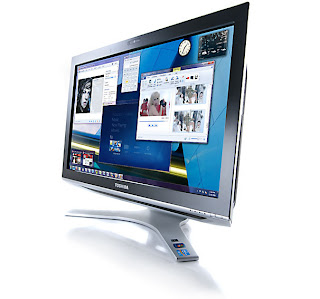
Toshiba DX1215Reports are in on the new all-in-one DX1215 touchscreen from Toshiba and the reports are good. According to multiple reviews, Toshiba's DX1215 all-in-one has one of the best touchscreens on the market and the fancy wireless peripherals and amazing speakers give you a fairly decent all-in-one multimedia device. The only thing lacking is the mobile processor.

For $934 you can get the DX1215 with a second-generation Intel Core i5-2410M processor which, surprisingly enough, is a laptop processor as opposed to a desktop processor, as well as built-in HD graphics. In addition to that you also get 4GB of RAM, a 1TB hard drive and built-in WiFi and Bluetooth. The DX1215 also runs a 64-bit version of Windows 7 Home Premium as an operating system.

The 21.5" touchscreen is extremely pleasing aesthetically, being very bright with excellent color representation and excellent contrast. The touchscreen is also one of the most responsive and most accurate touchscreens on the market. The glossy screen surrounded by a thin, shiny black bezel, has a native 1,920 x 1,080 resolution, making all of your HD pictures and videos really pop. Picture quality is clear and crisp though the viewing angels could be better as the screen gets significantly darker the more you move to either side.

Multitouch works impeccably and there is almost no lag whatsoever, which definitely makes the experience so much more enjoyable. Unfortunately, Toshiba has yet to fully optimize the DX1215's version of Windows 7 for touchscreens, so you may run into some trouble using some regular apps, like Internet Explorer, right out of the box. Thankfully this is something that can be easily calibrated, even though it is an odd problem to have considering how much time Toshiba spent on the actual screen.

As far as performance, the DX1215 could be better, especially considering its position as a budget all-in-one. The device only gets a WorldBench 6 benchmark score of 115, though that isn't too surprising considering the mobile processor. Graphics performance isn't anything to blow your mind either. However, the DX1215 did perform better than some other devices for around the same price. The DX1215 relies on Intel's integrated HD graphics with a frame rate of 45.8 fps.

Overall the DX1215 from Toshiba is stylish with some sleek peripherals and an awesome touchscreen and speakers. However, it isn't the best when it comes to performance and the software isn't top-of-the-line either. A lot of unnecessary software and an interface that isn't optimized for a touchscreen are definitely some major inconveniences but not necessarily a deal breaker for most.

Source: PC World - Toshiba DX1215


Put your eye on the problem with Camera Security Now, installing security cameras since 1999. We install in the US and we can help you do it yourself.


Call us toll free 877-422-1907 between 8am EST and 5pm PST M-F. Talk to an expert about your serious security camera needs.

Wednesday, October 19, 2011

iLid Computer Tables

iLid computer tableLove having a desktop computer but hate how your monitor takes up a lot of space? If so, iLid has the solution for you! iLid has just designed an LCD monitor table that gives you easy access to an LCD monitor whenever you need it without taking up premium desktop space.

The table comes with a monitor attached to a panel that is mounted on a friction-fitting hinge. Once flipped over, all you have to do is adjust the monitor to your desired viewing angle and you are ready to go. Your keyboard sits on a convenient storage shelf or optional pull-out tray so your desk is free for everything else you need it for.

The adjustable monitor angles accommodate different working styles and users are able to manipulate it in order to suit their own workspace needs. In addition to that, iLid computer workstations offer you 10" of depth on your desktop when the screen is in use, ensuring that you have enough room for both your computer and whatever you are working on.

iLid computer workstations are perfect for classroom settings, allowing professors to have the computers up or down depending on the day's activities. In a professional setting, these desks make the necessary exchange of computer and text resources as effortless as turning over a piece of paper.

The best thing is that iLid offers single and double iLid computer stations. The double iLid station offers two slots for two monitors separated by a desk space. The single configuration is a comprehensive solo workstation that is ideal for anybody who is working from home or uses their computer desk for more than just using a computer.

Source: PRWeb - SMARTdesks Opens the iLid: A New Generation of Flip Computer Tables


Find out what is going on in the Tech Army World.


What are the Top 10 Money Making Missions?

What other companies have joined and what do they do?

How do I join the
Tech Army Organization ?

Friday, October 7, 2011

LG ISP5 Series Coming Soon

LG ISP5 SeriesWhile it isn't news that your computer monitor provides you with invaluable experience when using your computer, there are companies out there that are trying to make that experience better. One such company is LG and one such series of monitors is the LG IPS5 Series, which looks to provide an increased user experience.

The LG IPS5 Series uses an IPS panel (obviously) in its design in order to provide a better picture. Color temperatures measure in at nearly 6,500K and the contrast ratio tops out at 5,000,000:1. In addition to that, all monitors in the series also have a full 1,920 x 1,080 HD resolution.

Another interesting feature is the Dual Package feature. This makes adding a secondary monitor to your setup much simpler and also allows you to have a pretty cool looking setup. You also don't have to mess with calibrating the monitors as each one is calibrated before you buy it. You will even get a report from LG about how your particular monitor was calibrated.

The LG IPS5 Series comes in two sizes, 21.5" and 23", and should both be available soon. However, you could always wait until November when LG unleashes the ISP5P, which gives you everything you get with the standard ISP5 as well as a posing stand with adjustable height.

Pricing is currently unavailable though both monitors do look very nice, especially if you are considering a new monitor or building a custom PC. Keep an eye out for the LG ISP5 Series of monitors when they start dropping in on store shelves in the next couple of weeks.

Source: TFTS - LG IPS5 Monitors Start Selling Soon, Reportedly Offers Colors To Match Reality Itself [LG's New Line Of Computer Monitors, The IPS5 Series, Set To Land With Promises Of Impressive Color And Picture]

Power Point Projectors
Most business class projectors will do a good job displaying your PowerPoint presentation. If you have a small presentation group, a 2000 lumen LCD projector will be able to produce a nice and clear picture. For larger audiences you should consider a 5000 lumen LCD projector.

Wednesday, September 28, 2011

Monitor Rentals from RentRPC

Monitor Rentals
Monitor Rentals can be great for several reasons, not just simple computer uses.

They can:

Temporarily Increase Your Viewing Capacities
One way to increase work productivity during busy times is to increase the number of monitors you are using with your PC. With an extra monitor or two, you are better able to multitask. No more switching tabs or having to go back and forth between applications.

Increase Appeal and Traffic at Trade Shows & Conventions
Display products and information for people who pass by your booth. With the visual appeal, more people will be interested in what you offer. If you need extra monitors for your trade show or convention, then the Rentrpc.com agents can get you the right kind and number of monitors for your need.

Plasma Screen Rentals also make great monitors. Most plasma screens these days can be used as computer monitors. So if you need a monitor that is larger than average, You should consider a plasma screen rental. With a plasma you can also achieve high-def quality, and get much richer color tones than you could with a typical computer monitor.

Monday, September 26, 2011

Increase in Mobile Computing Sees Decrease in Monitor Sales


While the computer industry may be growing at a rapid rate, there is one aspect of it that is falling behind. It has become obvious over the last couple of years that, as a result of the rise of laptops and tablets, the computer monitor industry has seen a dent in sales, at least in terms of standalone PC monitors.

If that wasn't bad enough, sales are now starting to decline at a faster rate than ever. European display market researcher Meko has discovered that monitor sales have dropped nearly 13.6% in Europe, the Middle East and Africa since the last quarter. What is even more unfortunate is that this marks the fourth straight quarter of decline.

In addition to that, the rate of decline is also increasing with consumer sales taking a majority of the impact. North American market researcher DisplaySearch has also witnessed a similar decrease in sales in the North American market. Monitor sales have decreased 15% year-over-year since last quarter after a brief but overall insignificant 1% increase between 2009 and 2010. These numbers also include monitors that were bundled with desktop PCs.

However, many market researches have stated that the decrease in sales was not entirely unanticipated, and not just because of the influx of laptops and tablets. Without new innovations in monitor technology, like going from CRT to flat-panel or from 4:3 to widescreen, there really isn't a lot of incentive for PC owners to go out and buy a new monitor.

What's more interesting is that, despite the drop in sales, the price of monitors hasn't really changed. LED-backlit displays, which were originally designed to raise the average selling price of monitors, are being priced similarly to CCFL-backlit LCD monitors. It seems that no matter what the price is, demand is just not going to be there.

However, DisplaySearch still sees a need for standalone monitors in the home. A lot of people are looking into "smart" monitors that have the ability to connect to the internet or to other computing devices. These devices would then act as a hub when a user needs a larger screen or extra monitor. But despite that, it is sad to see a decline in monitor sales. Hopefully more people will get into the realm of custom PC builds, a field that requires the purchase of at least one if not multiple monitors.

Source: PC World - Monitor Sales Keep Plummeting as Mobile Takes Over


Computers, Desktops, Laptops, Servers and the latest in Portable Tablet PCs are available from your computer rental company, Rentacomputer.com.

Talk to a Rentacomputer.com Tech Travel Agent Today!
Call Toll free 800-736-8772.